Internals
SensESP builds on a number of interface classes and abstractions and following the code logic can feel overwhelming if you’re not familiar with the concepts. This page provides a brief overview of the internals of the library.
Observables
The Observable base class implements the Observer pattern. Any class inheriting from Observable can be observed. In practical terms, you can call observable->attach(cb) to attach the callback cb to the Observable instance. When the Observable instance value is updated, the notify() method is called, causing all the attached callbacks to be called in turn.
The value in having Observables is that you don’t have to know in advance who is interested in object value updates, or how many interested parties there are.
Usually, the attached callback will propagate the new value of the Observable to the observer object.
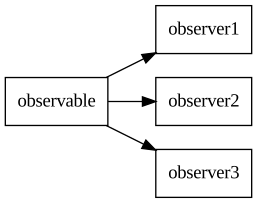
This simplified graph shows an Observable with three observers:
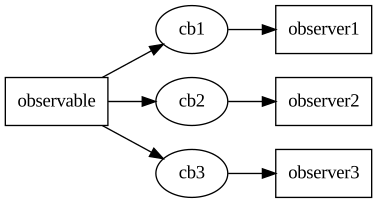
This is the same graph with the callbacks shown:
Producers and Consumers
Moving forward from Observables, we have Producers and Consumers, implemented in the ValueProducer and ValueConsumer classes respectively.
Producers are Observables that additionally define a connect_to() method that can be used to connect the Producer to a Consumer. The connect_to() method creates a standardized callback between the two objects, thus allowing you to connect the two without having to define the callback yourself.
Consumers, on their turn, are classes that implement the set() method that the Observable callback will call. Consumers also define a connect_from() convenience method for connecting the Consumer to a Producer. connect_from() is a bit more complex than connect_to() because it “goes against the flow”, so to speak, but it can come in handy in many situations. Note: connect_from() is deprecated in v3; prefer using connect_to() instead.
It is common for a class to be both a ValueProducer and a ValueConsumer. Such classes typically receive values, perform some operations, and then notify their consumers, thus creating a transform of the input. Transform classes are described in the Transforms section.
An important difference between Observables and Producers is that Producers are typed. ValueProducer is a template class that, when instantiated, will also have its output type defined. This means that a StringProducer cannot be connected to an IntConsumer because the types don’t match.
There is nothing wrong in using the ValueProducer<T> and ValueConsumer<T> classes directly, but some pre-specialized convenience classes have been defined for common use cases:
FloatProducerIntProducerBoolProducerStringProducer
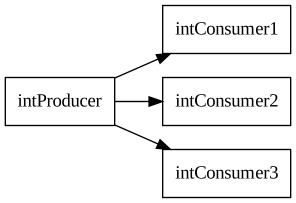
The value propagation graph for Producers and Consumers is almost identical to the one for Observables. Shown here is an example of IntProducers and IntConsumers:
Automatic type conversions for types that can be converter with a type cast are also available. Hence, it is possible to connect a IntProducer to an FloatConsumer, etc. Converting from String to bool, for example, is not possible because no such type cast exists. Manual conversion can be created with a LambdaTransform, for example.
ObservableValue is one of the simplest Producers. By itself, it does nothing, but it implements the ValueProducer interface, and you can connect ValueConsumer objects to it. If you update the value of the ObservableValue, all the connected consumers will be notified. This approach can be used to inject arbitrary data into SensESP processing networks.
Advanced: Member Producers and Consumers
When a class needs multiple typed inputs or multiple typed outputs, inheriting directly from ValueConsumer<T> or ValueProducer<T> for each type becomes unwieldy. C++ does not allow inheriting the same template base class with different type parameters, so a class that needs both a temperature input and a pressure input cannot simply inherit from both ValueConsumer<float> twice.
The solution is to expose ValueProducer or ValueConsumer members and have external code connect to the members rather than the parent object.
The pattern:
- The class creates
LambdaConsumer<T>members for inputs, each with a lambda that processes the value internally. - The class creates
ValueProducer<T>members (orObservableValue<T>) for outputs. - Getter methods expose references to these members.
- External code connects via:
some_producer->connect_to(&obj->get_foo_consumer())
Example: Join transform
The Join and Zip transforms use this pattern. They accept multiple inputs through a tuple of consumer members:
auto* join = new Join<float, float>();

// Connect to individual consumer members, not to the join object itself
temperature_sensor->connect_to(&std::get<0>(join->consumers));
pressure_sensor->connect_to(&std::get<1>(join->consumers));

// The join object itself is a ValueProducer<std::tuple<float, float>>
join->connect_to(some_downstream_transform);
Example: Custom multi-input class
Here is a sketch of a bilge alarm controller that takes water level and pump state as separate inputs and produces an alarm output:
class BilgeAlarmController : public ValueProducer<bool> {
 public:
  BilgeAlarmController() :
      water_level_consumer_([this](float level) {
        this->water_level_ = level;
        this->evaluate();
      }),
      pump_state_consumer_([this](bool running) {
        this->pump_running_ = running;
        this->evaluate();
      }) {}

  ValueConsumer<float>& get_water_level_consumer() {
    return water_level_consumer_;
  }

  ValueConsumer<bool>& get_pump_state_consumer() {
    return pump_state_consumer_;
  }

 private:
  void evaluate() {
    bool alarm = (water_level_ > 0.8) && !pump_running_;
    this->emit(alarm);
  }

  LambdaConsumer<float> water_level_consumer_;
  LambdaConsumer<bool> pump_state_consumer_;
  float water_level_ = 0;
  bool pump_running_ = false;
};
Usage:
auto* alarm = new BilgeAlarmController();

water_level_sensor->connect_to(&alarm->get_water_level_consumer());
pump_state_sensor->connect_to(&alarm->get_pump_state_consumer());
alarm->connect_to(new SKOutputBool("electrical.bilgePump.alarm"));
When to use this pattern: Whenever your class needs more than one typed input, or when you want to expose multiple typed outputs from a single object. It is cleaner than complex inheritance hierarchies and allows each input or output to have its own type.
This pattern is used extensively within SensESP itself. For example, SystemStatusController uses member consumers for WiFi state and WebSocket connection state, and SKWSClient exposes member producers for delta transmit and receive counts.
Saveables and Serializables
SensESP can persist many objects to the local file system. In particular, class objects that inherit from Serializable can be serialized to JSON and deserialized back. Likewise, any class inheriting from ‘FileSystemSaveable’ allows saving and loading of the object to and from the file system.
Sensors
Sensors are classes that read value from some real-world source and provide them to the rest of the system. Building on the concepts described above, a Sensor subclass is a ValueProducer of a certain type and a SensorConfig. In other words, it is something that you can attach Observables or Consumers to, which can store and retrieve its own configuration (and can be configured via the web interface). (Startable still exists as a backward-compatibility stub but is no longer part of the primary inheritance chain.)
Like ValueProducers, all Sensors inherit from the Sensor<T> template class, and there are pre-specialized classes for convenience: FloatSensor, IntSensor, BoolSensor, and StringSensor.
When creating new sensor classes, inheriting from Sensor requires writing quite a bit of boilerplate that may not be very relevant for simple sensor classes. If you are creating a new sensor that simply reads a value using an external library at given time intervals, you can use the RepeatSensor class instead.
Sensors are further discussed on the Sensors section of the Concepts page.
Transforms
Transforms are classes that take a value in, perform some operation on the value, and then spit a new value out. They implement both ValueProducer and ValueConsumer interfaces. Furthermore, the Transform class is a Configurable and a Startable.
The input and output types of a Transform do not have to be the same, and often aren’t.
In many common cases, defining a new Transform subclass is a lot of work and can be avoided by using the LambdaTransform class. A LambdaTransform is a class that takes a lambda function as a parameter, conveniently avoiding the need to define a new class.
Transforms are further discussed on the Transforms section of the Concepts page.
Configuration API
The web user interface of SensESP is implemented using a RESTful configuration API that can be used independently of the web UI. It would, for example, be possible to create a Signal K plugin for configuring all connected sensors over their configuration interfaces.
Regular SensESP devices listen to HTTP port 80. The following calls are supported:
| Path | Method | Description |
|---|---|---|
| /config | GET | Get a list of all configuration paths |
| /config/PATH | GET | Get the Json configuration object for configuration path PATH |
| /config/PATH | PUT | Update the configuration for path PATH |
| /info | GET | Get information text for the device |
| /device/reset | GET | Factory reset the device |
| /device/restart | GET | Restart the device |